
As research and education networks continue to expand, securing institutional resources has become more critical than ever. Universities and research organizations now operate diverse digital environments supporting administrative services, student access, learning platforms, laboratories, data centers, IoT devices, and security systems. Without proper segmentation and traffic control, these environments can quickly become vulnerable to misuse, accidental access, or cyber threats.
At the core of modern network security lies a simple but powerful concept: Access Control Lists (ACLs). ACLs allow network engineers to define which users, systems, or VLANs that are permitted to communicate or access specific resources. When implemented at the Layer 3 boundary, ACLs help enforce organizational policies, restrict lateral movement, and protect sensitive infrastructure without affecting the general usability of the network.
ACLs remain one of the most versatile and widely used mechanisms for securing network infrastructure. Whether configured on routers, firewalls, or Layer 3 switches, they form a critical first layer of defense by determining what traffic is allowed into, across, or out of the network. This blog introduces key ACL concepts, explains their relevance in modern campus environments, and walks through a simple lab scenario for practical understanding.
We will explore how ACLs can be used to enforce role-based access policies within an institutional network. Using a Layer 3 switch as the core routing device, demonstrate how to segment Students, servers, printers networks into separate VLANs, and how to apply ACLs to regulate who can access what. This approach mirrors common deployments across several institutions.
What are ACLs?
Access Control List (ACL) is a list of rules that control network traffic and reduce network attacks. It is used in routers, switches, and firewalls to determine which packets are allowed or denied. ACLs operate at Layer 3 (Network Layer) and Layer 4 (Transport Layer) of the OSI model.
Why ACLs are Important?
– Improve network security by restricting unauthorized access.
– Improve network security by restricting unauthorized access.
– Filter traffic to reduce congestion and improve performance.
– Provide control over network resources.
-Enable segmentation of traffic based on business needs.
Types of ACLs
1. Standard ACL
-Filters traffic based only on source IP address.
-Applied closer to the destination.
Example: Block a host or subnet.
NOTE: This denies traffic from host 192.168.10.0, permits all others
access-list 1 deny 192.168.10.0 0.0.0.255
access-list 1 permit any
interface fastEthernet 0/0
ip access-group 1 in
2. Extended ACL
Filters traffic based on source IP, destination IP, protocol (TCP/UDP/ICMP), and port numbers.
Provides granular control.
Applied closer to the source.
NOTE: This denies HTTP traffic from 192.168.10.0/24 network, allows everything else.
access-list 100 deny tcp 192.168.10.0 0.0.0.255 any eq 80
access-list 100 permit ip any any
interface fastEthernet 0/0
ip access-group 100 in
3. Named ACL
-Uses a name instead of a number.
-Easier to manage and modify.
NOTE: This blocks host 192.168.10.50 using named ACL
ip access-list standard BLOCK_HOST
deny 192.168.10.50
permit any
interface fastEthernet 0/0
ip access-group BLOCK_HOST in
ACL Best Practices
- Place standard ACLs near the destination.
- Place extended ACLs near the source.
- Put specific rules before general ones.
- Add required permit statements to avoid implicit deny.
- Use remarks to document ACL purpose.
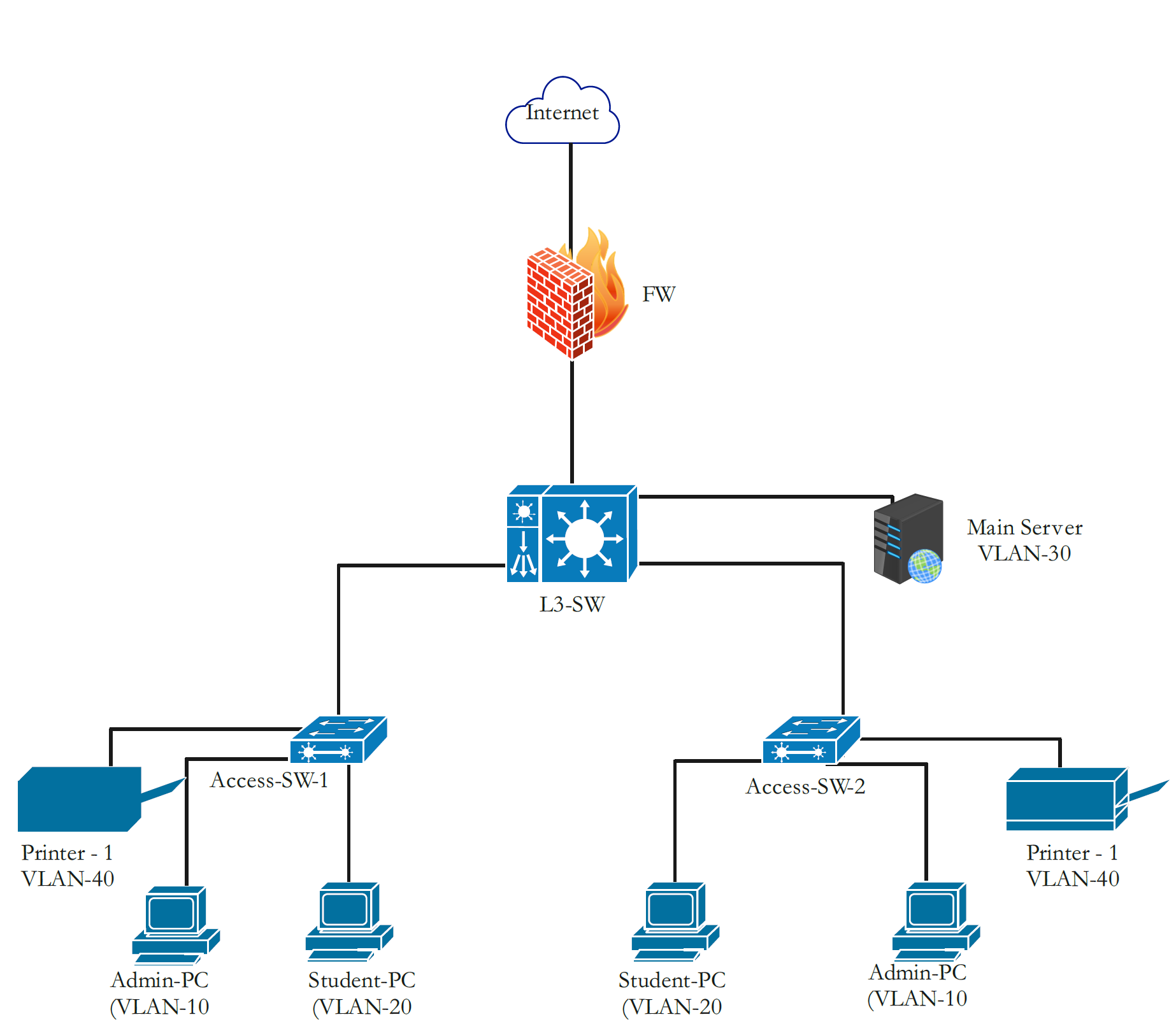
To understand the benefits of using ACLs in your network, consider the following network topology overview.
In this setup, the CORE-SWITCH functions as the Layer 3 boundary for all internal VLANs. The Admin, Student,Printer and Server networks each have independent broadcast domains controlled through Switch Virtual Interfaces (SVIs). To enforce security policies, an Extended ACL (120) is applied inbound on VLAN 20. This selectively blocks Student VLAN traffic from reaching the Server and Admin VLANs, while still allowing all other permitted flows such as Internet access or communication. The ACL is intentionally placed close to the source VLAN to optimize processing and reduce unnecessary traffic propagation through the network.
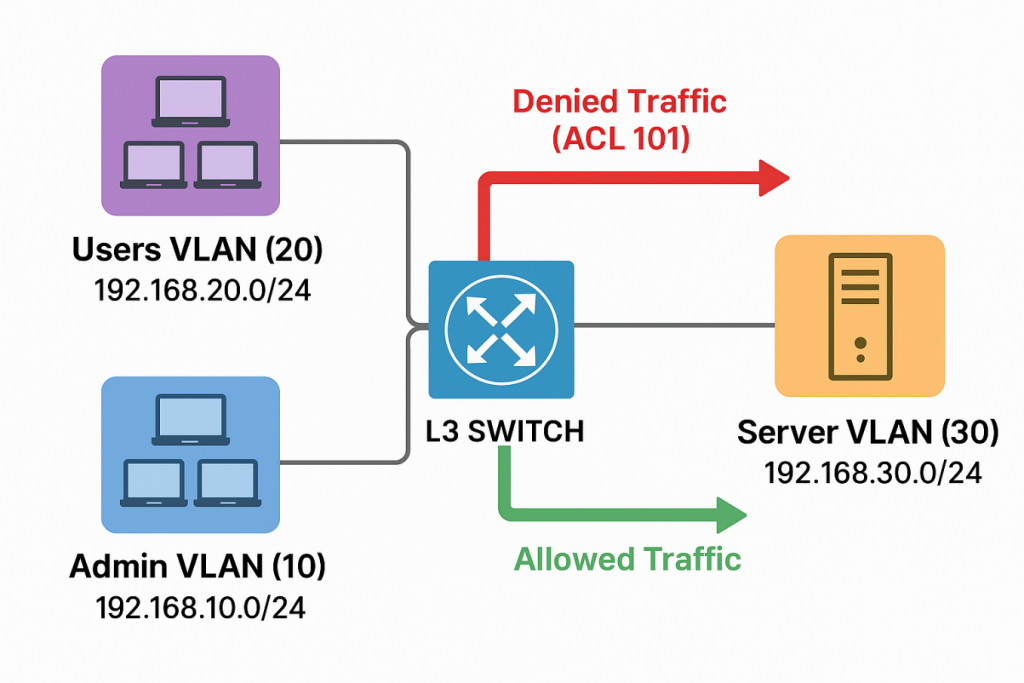
Imagine a server that stores critical institutional files, and only administrators should be allowed to access it. To enforce this, an ACL can be applied on the Layer 3 switch that: -Permits traffic from the Admin VLAN -Denies traffic from the User VLAN By allowing only the Admin VLAN to reach the server and blocking all other unauthorized VLANs, the ACL ensures that sensitive data remains protected and accessible only to the intended users.
VLAN Creation and Port Mapping
vlan 10
name ADMIN-NETWORK
vlan 20
name STUDENTS-NETWORK
vlan 30
name SERVERS-NETWORK
vlan 40
name PRINTERS-NETWORK
vlan 100
name MANAGEMENT-NETWORK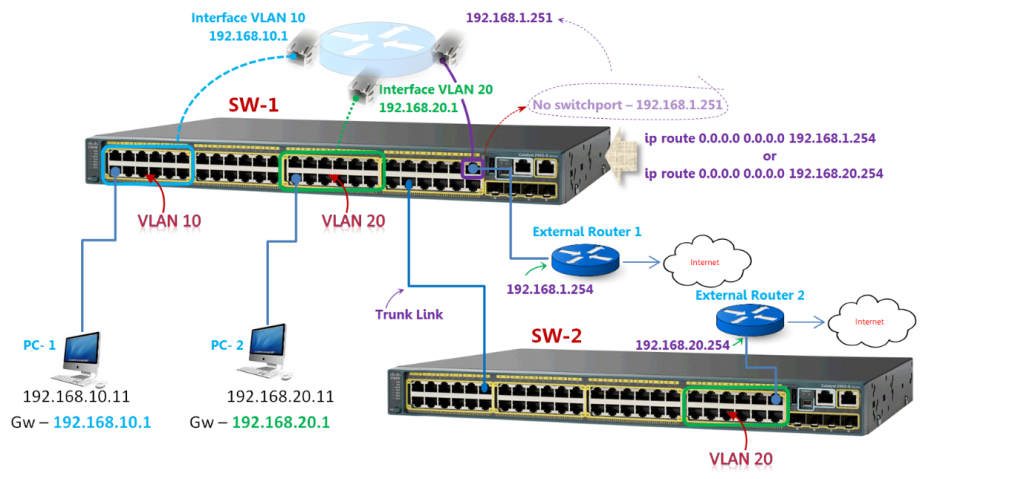
SVI (Interface VLAN) Configuration
interface Vlan10
description ADMIN-NETWORK
ip address 192.168.10.1 255.255.255.0

interface Vlan20
description STUDENTS-NETWORK
ip address 192.168.20.1 255.255.255.0
ip access-group 120 in

interface Vlan30
description SERVERS-NETWORK
ip address 192.168.30.1 255.255.255.0

interface Vlan40
description PRINTERS-NETWORK
ip address 192.168.40.1 255.255.255.0

interface Vlan100
description MANAGEMENT-NETWORK
ip address 192.168.100.2 255.255.255.0

Port Configurations
interface range fa0/3
switchport mode access
switchport access vlan 30 ! Servers
interface range fa0/4
switchport mode access
switchport access vlan 100 ! Management

interface range fa0/1 - 2
switchport mode trunk
switchport trunk encapsulation dot1q
switchport trunk allowed vlan 10,20,30,40 ! Uplink to Access Switches
ACL Configuration
access-list 120 deny ip 192.168.20.0 0.0.0.255 192.168.10.0 0.0.0.255
access-list 120 deny ip 192.168.20.0 0.0.0.255 192.168.30.0 0.0.0.255
access-list 120 permit ip 192.168.20.0 0.0.0.255 192.168.40.0 0.0.0.255
access-list 120 permit ip any any
ACL Purpose and Explanation
deny ip 192.168.20.0 0.0.0.255 192.168.10.0 0.0.0.255
Blocks: Students → Admin VLAN
Prevents users in VLAN 20 from accessing administrative systems.
deny ip 192.168.20.0 0.0.0.255 192.168.30.0 0.0.0.255
Blocks: Students → Servers VLAN
Protects sensitive server resources from student access.
permit ip 192.168.20.0 0.0.0.255 192.168.40.0 0.0.0.255
Allows: Students → Printers VLAN
Enables users in VLAN 20 to access shared network printers.
permit ip any any
Allows: All remaining traffic
Prevents the ACL from blocking everything due to implicit deny.
Applying the ACL to VLAN 20
interface Vlan20
ip access-group 120 in
This attaches ACL 120 inbound on the Students VLAN so all traffic from VLAN 20 is filtered according to your rules.
Extended IP access list 120
This part is essential to allow two-way communication between Students (VLAN 20) ↔ Admin (VLAN 10) and Admin ↔ Students
deny ip 192.168.20.0 0.0.0.255 192.168.30.0 0.0.0.255
permit ip 192.168.20.0 0.0.0.255 192.168.10.0 0.0.0.255
permit ip 192.168.20.0 0.0.0.255 192.168.40.0 0.0.0.255
permit ip any any
Management Access Control (Admin-Only Device Access)
To further strengthen network security, it is important to ensure that only the Admin VLAN can manage network devices. This prevents unauthorized users such as students or guests from attempting to access the switch through SSH, Telnet, Web GUI, or SNMP.
The following ACL, named MGMT-PROTECT, restricts all management-plane access exclusively to devices within the Admin VLAN (192.168.10.0/24).
- Management Protection ACL
ip access-list extended MGMT-PROTECT
permit tcp 192.168.10.0 0.0.0.255 any eq 22 ! Allow SSH
permit tcp 192.168.10.0 0.0.0.255 any eq 23 ! Allow Telnet (if enabled)
permit tcp 192.168.10.0 0.0.0.255 any eq 80 ! Allow HTTP GUI
permit tcp 192.168.10.0 0.0.0.255 any eq 443 ! Allow HTTPS GUI
permit udp 192.168.10.0 0.0.0.255 any eq 161 ! Allow SNMP
deny ip any any ! Block all other sources- Applying the ACL to Management Interfaces
Apply the ACL to both VTY lines (remote access) and the management SVI to fully restrict device management:
line vty 0 4
access-class MGMT-PROTECT in
Protect the Management VLAN Interface
interface Vlan10
ip access-group MGMT-PROTECT in- With this configuration;
Only Admin VLAN devices (192.168.10.0/24)
can access the switch using:
-SSH
-Telnet (if enabled)
-Web GUI (HTTP/HTTPS)
-SNMP
Students, printers, servers, and all other VLANs
cannot access management services.
This ensures that device management remains secure and isolated to authorized personnel only.
Configuration Tests for ACL, Device Access and management and important commands
Access Management ACL Verification
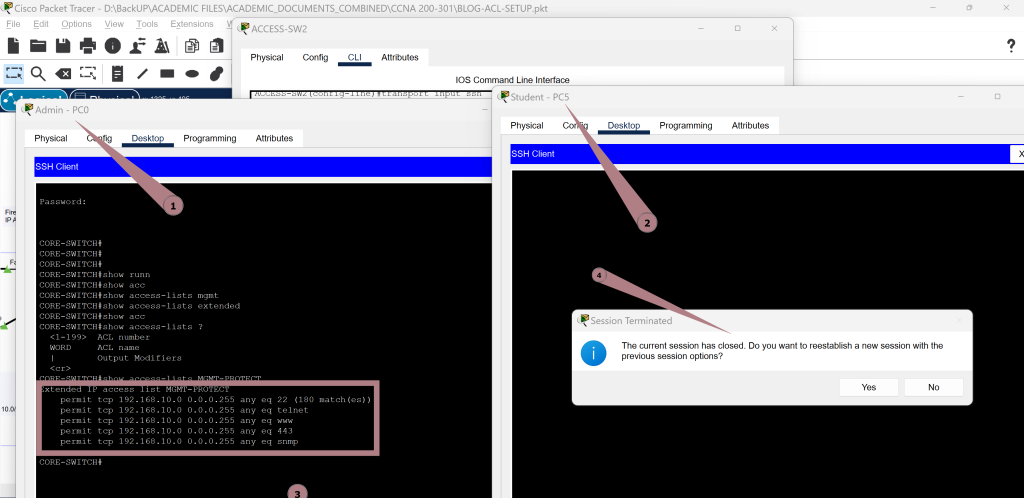
To confirm that the Management Protection ACL is functioning correctly, tests are performed from two different VLANs:
Admin PC (VLAN 10) – Successfully establishes an SSH session to the Core Switch.
The switch displays the MGMT-PROTECT ACL entries, showing permitted matches for SSH, HTTP/HTTPS, Telnet, and SNMP traffic. This confirms that the Admin VLAN is allowed to manage the device.
Student PC (VLAN 20) – Attempts to open an SSH session to the switch, but the connection is immediately terminated.
The session failure message indicates that the ACL is correctly blocking all management access from non-admin VLANs.
This test validates that only authorized administrators can remotely manage the switch, while all other users are denied access as intended.
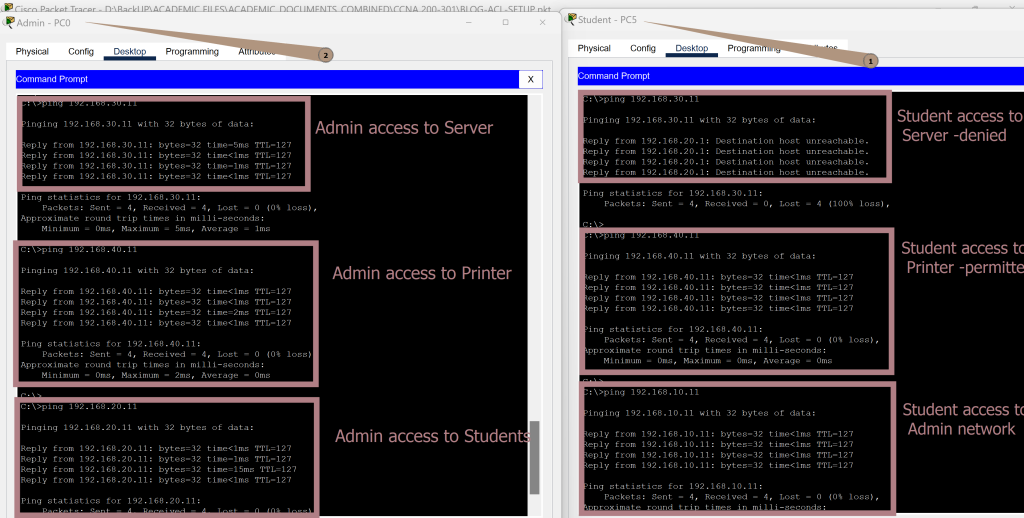
Verification of Admin and Student Access to Server, Printer, and Two-Way Communication
Connectivity tests show the ACLs working as intended; Admin can reach the Server, Printer, and Student networks. Students are blocked from the Server but can access the Printer.
Two-way communication between Admin and Student networks is allowed. These results confirm that both access restrictions and permitted flows are correctly enforced
Testing & Verification Commands
show vlan brief
show ip interface brief
show access-lists
show running-config
show interfaces trunk
ping <Specify the IP Address>
Reference links for further reading
VLAN Over-View
https://www.cisco.com/c/en/us/td/docs/switches/lan/campus/design/guide/vlans.html
Configuring Access Control Lists
https://www.cisco.com/c/en/us/support/docs/security/ios-firewall/23602-confaccesslists.html
Cisco IOS Security: ACL Fundamentals
https://www.cisco.com/c/en/us/support/docs/ip/access-lists/26448-ACL-fundamentals.html
Secure Shell (SSH) Configuration Guide
https://www.cisco.com/c/en/us/support/docs/security-vpn/secure-shell-ssh/4145-ssh.html
Challenges and Lessons Learnt
1. ACL Placement
Placing the management ACL on the Admin VLAN blocked normal traffic.
Lesson: Apply MGMT ACLs only to VTY lines, not production VLANs.
2. One-Way Traffic Behavior
Student → Admin was blocked while Admin → Student worked.
Lesson: ACLs are directional; inbound filters do not affect outbound traffic.
3. Implicit Deny Side Effects
Missing permit rules caused Admin traffic to fail.
Lesson: Always account for the implicit deny any at the end of ACLs.
4. Balancing Security vs. Functionality
Over-restrictive ACLs initially broke valid communication.
Lesson: Design ACLs that secure the network without limiting essential operations.
5. Need for Continuous Testing
Ping and SSH tests exposed ACL problems quickly.
Lesson: Test every path after changes—Admin, Student, Server, Printer.
CONCLUSION
Implementing VLANs and ACLs on a Layer 3 switch provides a powerful foundation for securing and organizing modern campus networks. Through proper segmentation, clear access rules, and controlled management access, institutions can protect critical resources while still enabling smooth communication between different user groups. This practical exercise demonstrated how well-designed ACLs can enforce policy, prevent unauthorized access, and maintain operational flexibility.
The key takeaway is that effective network security is not just about blocking traffic it’s about understanding how the network functions, applying rules in the right places, and continuously testing to ensure both security and usability. With careful planning and documentation, administrators can build scalable, secure, and efficient networks that support users without exposing vital systems to unnecessary risk
