
Border Gateway Protocol, the backbone of global Internet routing, was never designed with security in mind. As a result, BGP hijacks and route leaks pose significant threats to Internet stability and security. Resource Public Key Infrastructure (RPKI) addresses these risks by providing a cryptographic framework to validate the origin of BGP route advertisements.
This blog walks you through the entire RPKI process from creating Route Origin Authorizations (ROAs) to validating routes on Juniper devices using Routinator as the relying party software. Whether you are a network engineer looking to deploy this in production or just exploring BGP security, this guide offers practical steps and configurations.
By the end, you will have a blueprint for implementing RPKI to filter invalid routes, reducing the risk of unintended traffic or hijacking. Let’s dive in.
What is RPKI?
RPKI is a security framework that secures the internet’s routing infrastructure by cryptographically verifying the legitimacy of IP addresses. It builds on traditional Public Key Infrastructure principles but tailors them for IP address and Autonomous System resources. It allows resource holders (organizations allocated IP prefixes by Regional Internet Registries like AFRINIC) to authorize which Autonomous systems can originate advertisements for those prefixes cryptographically.
Routers can then validate whether a BGP route’s origin AS is legitimate, preventing accidental or malicious announcements.
Key components include:
- Trust Anchors (TAs): Root certificates from RIRs (e.g., AFRINIC, RIPE NCC) that anchor the chain of trust
- ROAs: Signed objects asserting “AS X can originate prefix Y up to length Z.”
- Relying Parties (RPs): Validators like Routinator that fetch, verify, and distribute data.
- Routers: Devices (such as Juniper MX Routers) that query validators and enforce routing policies.
Now that the key components are clear, the path forward is to turn them into action by following the steps required to deploy RPKI
Step 1: ROA Creation – Authorizing Route Origins
A ROA is a digitally signed object that says: “For this IP prefix (or set of prefixes) the AS X is authorized to originate route announcements.” It is typically published by the prefix holder in the Regional Internet Registry ecosystem.
To create a ROA, you must hold valid IP and AS resources delegated by an RIR and have an active RIR account with the right permissions. The steps below describe the process of creating ROAs
- Log in to the portal of your Regional Internet Registry, such as AFRINIC, RIPE or APNIC and navigate to the RPKI section.
- Under the RPKI section, you will be prompted to create ROAs. In creating ROAs, you will be required to enter the following information:
- Origin AS: The Autonomous System number that will be announcing the IP prefix.
- IP Prefix: The IP address block you are authorizing (e.g., x.x.x.0/24).
- Maximum Length: The most specific prefix length you want to allow. For example, a ROA for x.x.x.0/24 with a maximum length of /26 will authorize announcements for /24, /25, and /26.
Step 2: Fetching and Validating RPKI Data with Routinator
Routers should not handle heavy cryptographic operations, so they depend on a relying party software called a validator that fetches RPKI objects, validates the chain of trust, and outputs a list of Validated ROA Payloads.
In this setup, we shall use Routinator from NLnet Labs as our relying party software to provide validated data to our Juniper routers using the RPKI-to-Router (RTR) protocol.
Setup and Operation
The installation of the validator is set up on a server running Ubuntu 24.04. The installation can be completed as using the commands below
sudo apt update
sudo apt install ca-certificates curl gnupg lsb-releasecurl -fsSL https://packages.nlnetlabs.nl/aptkey.asc | sudo gpg --dearmor -o /usr/share/keyrings/nlnetlabs-archive-keyring.gpg
echo "deb [arch=$(dpkg --print-architecture) signed-by=/usr/share/keyrings/nlnetlabs-archive-keyring.gpg] \https://packages.nlnetlabs.nl/linux/ubuntu $(lsb_release -cs) main" | sudo tee /etc/apt/sources.list.d/nlnetlabs.list
sudo apt update && sudo apt install routinator
After the installation, you can check the status of the Routinator using the command
sudo systemctl status routinator
Routinator runs on the RTR service on port 3323 and the HTTP service on port 8323. In this setup, we are to set up Routinator to run the RTR service. This can be achieved using the following command.
routinator server --rtr=<server-ip>:3323Step 3: Integrating with Juniper Devices – Validation and Enforcement
Once the validator has finished processing and has validated the prefix-origin data, the router establishes a session with the validator using the RPKI to Router (RTR) protocol. Through this protocol, the router fetches the validated prefix-origin database. This database contains the list of route origins that are considered valid based on the RPKI data.
However, simply having access to this validation database doesn’t automatically change which routes the router installs into its routing table. To act on the validation, a routing policy that enforces decisions based on the validation status in the database.
The policy is configured to;
- Accept valid routes – Routes that match an existing ROA are allowed. These routes are covered by a ROA where the origin AS matches and the prefix length is less than or equal to the maximum length specified in the ROA.
- Accept unknown routes – Routes with no corresponding ROA are permitted. This is the status for the majority of routes on the internet that have not yet been protected by RPKI
- Reject invalid routes – These routes conflict with ROAs because the origin AS is incorrect or the prefix is more specific than allowed by the ROA’s maximum length. These are dropped.
The policy is then applied as an import policy on BGP received routes.
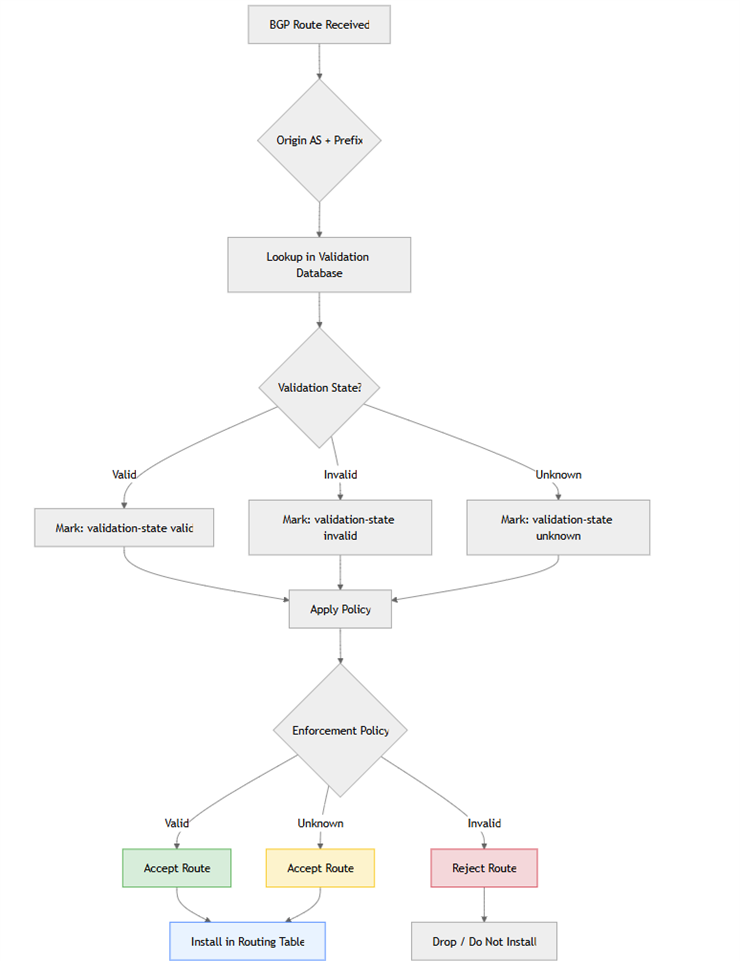
Configuration Steps
1. Configure the router to connect to the validator using RTR
set routing-options validation group RPKI session <validator-ip> port 3323 2. Create the RPKI Policy
A policy is created to accept valid and unknown routes and reject invalid routes
set policy-options policy-statement RPKI-CHECK term accept-valid from protocol bgp
set policy-options policy-statement RPKI-CHECK term accept-valid from validation-database valid
set policy-options policy-statement RPKI-CHECK term accept-valid then validation-state valid
set policy-options policy-statement RPKI-CHECK term accept-valid then accept
set policy-options policy-statement RPKI-CHECK term accept-unknown from protocol bgp
set policy-options policy-statement RPKI-CHECK term accept-unknown from validation-database unknown
set policy-options policy-statement RPKI-CHECK term accept-unknown then validation-state unknown
set policy-options policy-statement RPKI-CHECK term accept-unknown then accept
set policy-options policy-statement RPKI-CHECK term reject-invalid from protocol bgp
set policy-options policy-statement RPKI-CHECK term reject-invalid from validation-database invalid
set policy-options policy-statement RPKI-CHECK term reject-invalid then validation-state invalid
set policy-options policy-statement RPKI-CHECK term reject-invalid then reject
3. Applying the policy
The configured policy is applied as an import policy to external BGP neighbors
set protocols bgp group external import RPKI-CHECK4 Verify the configuration
To check the status of the validation session, run the command
root@rpki-router>show validation sessionTo confirm the status of the routes installed in the routing table, run the commands below. Valid and unknown routes are installed in the routing table
root@rpki-router>show route validation-state valid

root@rpki-router>show route validation-state unknown
Invalid routes appear as hidden routes in the routing table. Their presence can be confirmed using the following command
root@rpki-router>show route hidden validation-state invalidConclusion
You have reached the end of your PRKI Implementation journey. You have turned BGP from a trust-based protocol into a verified one, helping prevent route leaks and hijacks. Beyond protecting your own network, RPKI aligns with the goals of MANRS by promoting responsible routing practices and strengthening global Internet security. Kudos for making the Internet a safe place for everyone.
